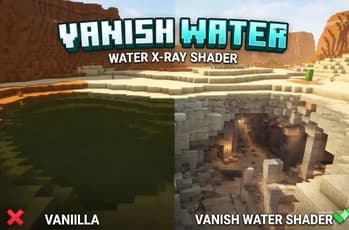

AquaVision-Dynamic Transparent Water
1.21.11SHADERby rafieeplayssmc
Preview

About
Aqua Vision is a lightweight Minecraft shader that temporarily hides water blocks when you view them from the outside, giving you an unobstructed view of oceans, lakes, and rivers. Once you enter the water, it returns to its normal appearance, preserving the natural underwater experience. (Warning ⚠) Recommended for private servers, creative builds, and cinematic use.
Preview
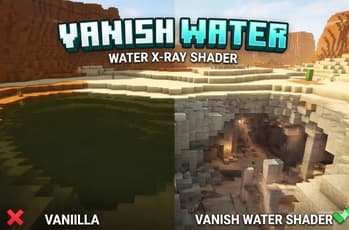
VanishWater – Realistic Water X-Ray Shader
About
Versions
VanishWater
4 months ago

rafieeplayssmc
Owner
Related Shaders

Complementary Shaders - Unbound
Transforming the visuals of Minecraft with exceptional quality, detail, and performance.

Photon Shaders
A gameplay-focused shader pack with a semi-realistic style

Solas Shader
A modern fantasy stylized shaderpack with colored lighting and stunning visuals

Bliss Shaders
A well performing fantasy styled shaderpack with emphasis on scene variation and customization.