Cinematic Color Correction
1.21.11SHADERby Bestsoft100
36.6K97
How to Install:
1. Download shader file→2. Open Minecraft with OptiFine/Iris→3. Video Settings > Shaders→4. Put file in shaders folder
Installation:
1. Download shader file•2. Open Minecraft with OptiFine/Iris•3. Go to Video Settings > Shaders•4. Click Shaders Folder•5. Put file in folder & select
Preview
![[v4] Beach and Forest](/_next/image?url=https%3A%2F%2Fcdn.modrinth.com%2Fdata%2Fm7MuMYfZ%2Fimages%2F46fa8108dc82b95aff73c2cdbf62b81a7a65e128_350.webp&w=3840&q=75)
[v4] Beach and Forest
![[v4] Lava Cave](/_next/image?url=https%3A%2F%2Fcdn.modrinth.com%2Fdata%2Fm7MuMYfZ%2Fimages%2F9d9d1b61a51cf160665e26220fccfdcd176e25b5_350.webp&w=3840&q=75)
[v4] Lava Cave
![[v3.1] More Cherry Grove](/_next/image?url=https%3A%2F%2Fcdn.modrinth.com%2Fdata%2Fm7MuMYfZ%2Fimages%2F0897cd61f2f758feb37bb6e374aef6e913b9545d_350.webp&w=3840&q=75)
[v3.1] More Cherry Grove
![[v3.1] Comparison](/_next/image?url=https%3A%2F%2Fcdn.modrinth.com%2Fdata%2Fm7MuMYfZ%2Fimages%2F5acc82e904f7c3e49e6f796890e2e53fd7f0d986_350.webp&w=3840&q=75)
[v3.1] Comparison
![[v3.1] Cherry Grove](/_next/image?url=https%3A%2F%2Fcdn.modrinth.com%2Fdata%2Fm7MuMYfZ%2Fimages%2F6af1a81b2d4f35cf3db9e82e4c45ac1e2e43056f_350.webp&w=3840&q=75)
[v3.1] Cherry Grove
![[v3.1] Village at Night](/_next/image?url=https%3A%2F%2Fcdn.modrinth.com%2Fdata%2Fm7MuMYfZ%2Fimages%2Fb2a41fd00926e0ae9c921907b6a0fe744d040cfa_350.webp&w=3840&q=75)
[v3.1] Village at Night
About
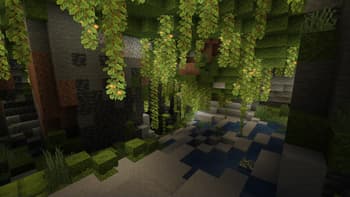
This shader gives the game a more cinematic look by changing the color and adding a Bloom effect. The only thing in this shader that impacts the performance is Bloom. With Bloom disabled, this shader probably runs on anything! Check out the Gallery!
Preview
![[v4] Lush Cave](/_next/image?url=https%3A%2F%2Fcdn.modrinth.com%2Fdata%2Fm7MuMYfZ%2Fimages%2Fc58944a6312eb22f5800358d70e6bc86ec531c99_350.webp&w=1920&q=75)
[v4] Lush Cave
![[v4] Beach and Forest](/_next/image?url=https%3A%2F%2Fcdn.modrinth.com%2Fdata%2Fm7MuMYfZ%2Fimages%2F46fa8108dc82b95aff73c2cdbf62b81a7a65e128_350.webp&w=1920&q=75)
[v4] Beach and Forest
![[v4] Lava Cave](/_next/image?url=https%3A%2F%2Fcdn.modrinth.com%2Fdata%2Fm7MuMYfZ%2Fimages%2F9d9d1b61a51cf160665e26220fccfdcd176e25b5_350.webp&w=1920&q=75)
[v4] Lava Cave
![[v3.1] More Cherry Grove](/_next/image?url=https%3A%2F%2Fcdn.modrinth.com%2Fdata%2Fm7MuMYfZ%2Fimages%2F0897cd61f2f758feb37bb6e374aef6e913b9545d_350.webp&w=1920&q=75)
[v3.1] More Cherry Grove
Versions
4.0
1 year ago
3.1
2 years ago
Developers

Bestsoft100
Owner
Related Shaders

Complementary Shaders - Reimagined
Preserving the elements of Minecraft with exceptional quality, detail, and performance.
atmospherebloomcartooncolored-lightingfantasyfoliagehighirislowmediumoptifinepbrpotatoreflectionsshadowsvanilla-like
54.0M

Complementary Shaders - Unbound
Transforming the visuals of Minecraft with exceptional quality, detail, and performance.
atmospherebloomcartooncolored-lightingfantasyfoliagehighirislowmediumoptifinepbrpotatoreflectionssemi-realisticshadows
34.8M

BSL Shaders
Shaderpack for Minecraft: Java Edition. It's bright, colorful, and distinct.
atmospherebloomcartooncolored-lightingfoliageirislowoptifinepbrreflectionsshadows
24.4M

Photon Shaders
A gameplay-focused shader pack with a semi-realistic style
atmospherebloomcolored-lightingfoliagehighirislowmediumoptifinepbrreflectionssemi-realisticshadows
20.7M